Never Disappoint a Customer Again: How Stock Status Keeps Your Digital Menu Honest
Toggle items on the left to see how your menu updates on the right
Grilled Salmon
Main Course · $24.99
Caesar Salad
Appetizers · $12.99
Margherita Pizza
Pizza · $16.99
The Garden Kitchen
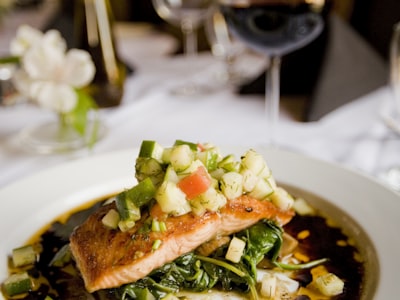
Grilled Salmon
$24.99Atlantic salmon fillet with lemon butter sauce
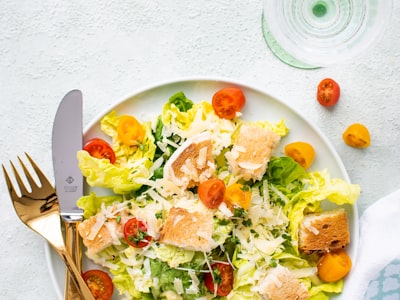
Caesar Salad
$12.99Romaine, parmesan, croutons, house dressing
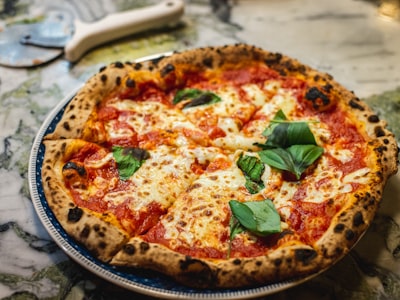
Margherita Pizza
San Marzano tomato, fresh mozzarella, basil
Toggle items in the admin panel to see how your public menu updates instantly
Every restaurant owner knows this scenario: a customer browses the menu, picks a dish that sounds perfect, places their order — and the waiter returns with, "Sorry, we're out of that." That moment costs more than a sale. It costs trust.
In the industry, marking an item as unavailable is called "86-ing" — a term that has been part of restaurant culture for decades. But while the concept is old, the way most restaurants handle it hasn't changed much: a whiteboard in the kitchen, a verbal heads-up to the servers, or simply hoping the waiter remembers.
With digital menus becoming the standard, there's no reason your customers should ever see an item that isn't available. That's exactly why we built Stock Status.
What Is Stock Status?
Stock Status is a dedicated page in your NEMENU dashboard designed for one thing: letting your team mark items as sold out in seconds. No digging through menus, no editing item details, no friction. Open the Stock Status page from the sidebar, find the item, toggle it off. Done.
Your digital menu updates instantly — customers see the item crossed out before they even think about ordering it. No re-publishing required.
Try it yourself — toggle items and variants in the interactive demo below to see exactly how Stock Status works:
The Problem with Traditional 86 Lists
Traditional 86 lists — whether they're scribbled on a whiteboard or shared verbally during pre-shift — have significant limitations:
- They only reach the staff who are present when the update happens
- They don't reach the customer at all — the menu still shows the item
- There's no record of who 86'd what, or when
- Items that should come back the next day are often forgotten
- Variant-level availability (e.g., "out of Large but Small is fine") is hard to communicate
Stock Status solves all of these problems by putting 86-ing where it belongs: directly on the menu your customers see.
Choose How Long It's Gone
Not every 86 is the same. Sometimes you're out for the night. Sometimes the supplier won't deliver until next week. Stock Status lets you pick a duration when marking an item as sold out:
| Duration | What Happens | Best For |
|---|---|---|
| Today | Item restores at 3 AM tomorrow (in your timezone) | Daily specials, fresh items that ran out during service |
| 1 Week | Item restores at 3 AM, 7 days later | Supplier delays, seasonal ingredients |
| Custom Date | Item restores at 3 AM on your chosen date | Planned unavailability, holidays, renovations |
| Indefinite | Stays sold out until you manually restore it | Discontinued items, permanent menu changes |
The restore time is based on your restaurant's timezone setting, so it works correctly whether you're in New York, London, or Tokyo. Timed items restore themselves automatically — your team doesn't need to remember to turn the salmon back on tomorrow morning.
Variant-Level Control
Here's something most 86 systems can't do: mark specific variants as sold out while keeping others available.
Ran out of the 12-piece wings but still have the 6-piece? Out of the large pizza but small and medium are fine? Stock Status works at the variant level. You can toggle individual sizes, portions, or options independently.
On the public menu, sold-out variants appear with a line-through and dimmed styling, so customers can see what options exist but clearly understand which ones aren't available right now. This is much better than hiding the entire item when only one size is gone.
Full Audit Trail
In a busy restaurant with multiple managers and shift leads, accountability matters. Stock Status logs every change automatically:
- Who marked the item as sold out (name and email)
- When the change was made
- What duration was selected
- When items were restored to stock
The audit log is visible right on the Stock Status page under "History." No more guessing who 86'd the risotto or when the kitchen ran out of the daily special. If there's a dispute or a pattern you want to investigate, the data is right there.
Instant Updates — No Re-Publishing
Most menu management systems require you to "publish" changes before they go live. That makes sense for things like new items, price changes, or description updates — you want to review those before customers see them.
But stock status is different. When you're out of something, every second counts. A customer is looking at your menu right now. If the grilled salmon is gone, they need to know immediately — not after someone remembers to hit "Publish."
That's why Stock Status updates bypass the publish flow entirely. The moment you toggle an item off, your live menu reflects the change. No delay, no extra steps.
Multi-Language Support
If your restaurant serves an international audience and your menu is available in multiple languages, stock status labels are automatically translated. The "Out of Stock" badge appears in whatever language the customer is viewing your menu in — no extra configuration needed.
NEMENU currently supports over 40 languages for static menu text, and the sold-out indicators are part of that system.
What Your Customers See
Stock Status changes how items appear on your public-facing digital menu. Here's what changes for each scenario:
| Scenario | How It Looks on the Menu |
|---|---|
| Item in stock | Normal display — full price, full description, no indicators |
| Entire item sold out | Dimmed appearance, price crossed out, "Out of Stock" badge shown |
| Specific variant sold out | That variant shown with strikethrough text and reduced opacity; other variants remain normal |
| Item sold out with a date | Same as sold out, with the item automatically restoring on the set date |
The styling is consistent across all 14+ NEMENU templates, and the "Out of Stock" label is translated into 40+ languages automatically.
How to Use Stock Status
Getting started takes less than a minute:
- Open the Stock Status page from the admin sidebar (look for the package icon)
- Use the search bar or category filter to find the item
- Toggle the switch to mark it as sold out
- Choose a duration: Today, 1 Week, a custom date, or Indefinite
- Your public menu updates instantly
To restore an item, simply toggle the switch back. If you need to restore everything at once — useful at the start of a new day — use the "Mark all in stock" button at the top of the page.
Why This Matters for Customer Experience
The impact of accurate menu availability goes beyond avoiding awkward conversations. Consider the downstream effects:
- Customers trust your menu more when it's always accurate
- Servers spend less time apologizing and more time selling
- Kitchen staff get fewer impossible orders during peak hours
- Your brand reputation improves — reliability builds loyalty
- Decision fatigue decreases when customers only see what's actually available
A study by the National Restaurant Association found that menu accuracy is one of the top factors influencing whether customers return to a restaurant. Stock Status helps you get this right every single service.
Built for the Rush
Stock Status was designed with busy service in mind. The interface is deliberately simple — a flat list of items with big, obvious toggle switches. No nested menus, no multi-step workflows, no confirmation dialogs. When the kitchen tells you the special is gone, you need to update the menu in three seconds, not thirty.
Search and category filters help you find items quickly even in menus with hundreds of items. And because changes are instant, you can confidently tell your team "it's already off the menu" the moment you tap the switch.
Getting Started
Stock Status is available to all NEMENU plans. If you're already using NEMENU for your digital menu, you'll find the Stock Status page in your admin sidebar under the Menu section. If you're new to NEMENU, you can create your digital menu for free and start managing stock status right away.
Your menu should always reflect reality. With Stock Status, it does.